Pretty website. Crickets in your inbox. What gives?
Why your website isn't generating leads, and how to find where inquiries get lost, starting with a test most owners skip.

Jessie Borgmann
Founder, Dotted Octopus

You invested in a website you're proud of. It looks polished, it feels like your brand, and people compliment it. Your inbox, meanwhile, is quiet.
When a website isn't generating leads, the instinct is to change something you can see: a new font, a different button color, a fresh animation. I'd hold off. A beautiful website can still leave important questions unanswered, and cosmetic changes won't fix a problem you haven't found yet.
Instead, work through five checks in order. Each one rules out a cause, so by the end you'll know where inquiries are getting lost and what's worth fixing.
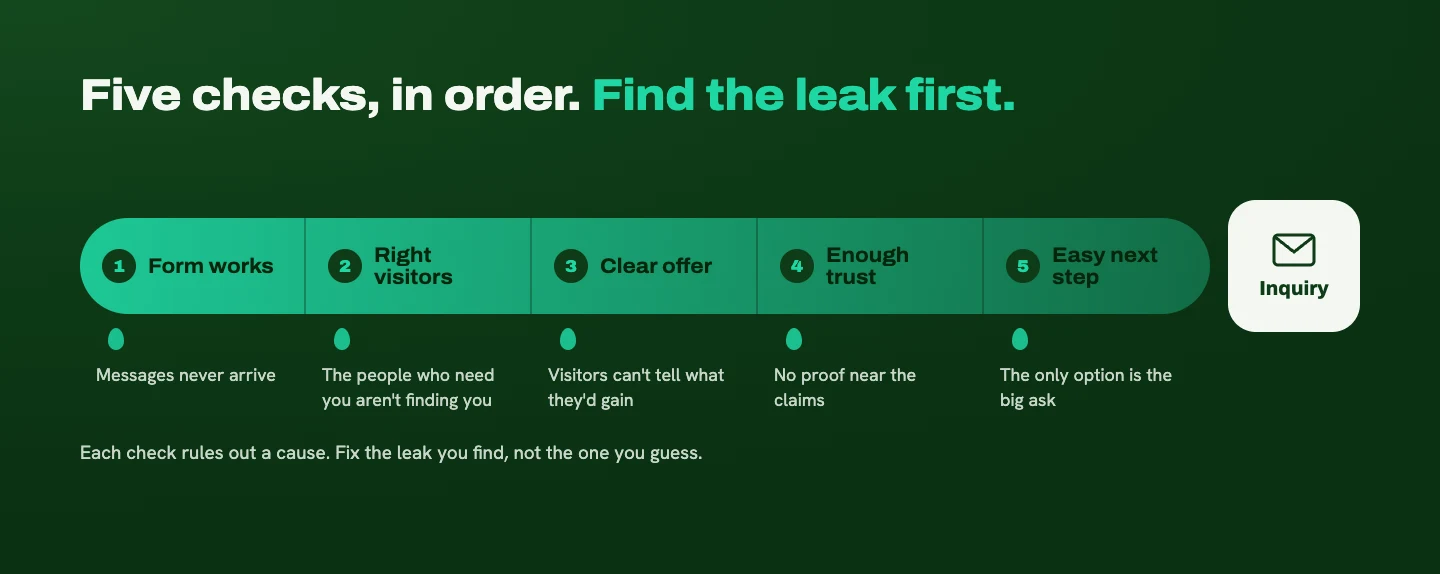
1. Make sure people can actually contact you
Before rewriting a single headline, I test whether someone can reach the business. It sounds too simple to matter. It's also the cheapest problem to fix and one of the easiest to miss.
Test the whole process, all the way through to receiving and replying to the message:
- Submit an inquiry on desktop and on your phone. Check required fields, error messages, spam protection, and the confirmation screen.
- Follow the message. Confirm it's stored where you expect and arrives in the right inbox. Check your spam folder, who receives notifications, and the reply-to address.
- Check your CRM. If the form sends inquiries to a CRM or email tool, make sure they land there too.
A success message only tells you part of the story. A visitor can see "Thanks, we'll be in touch!" while the notification goes to an old email address nobody checks. From their side, they reached out. From yours, nobody did.
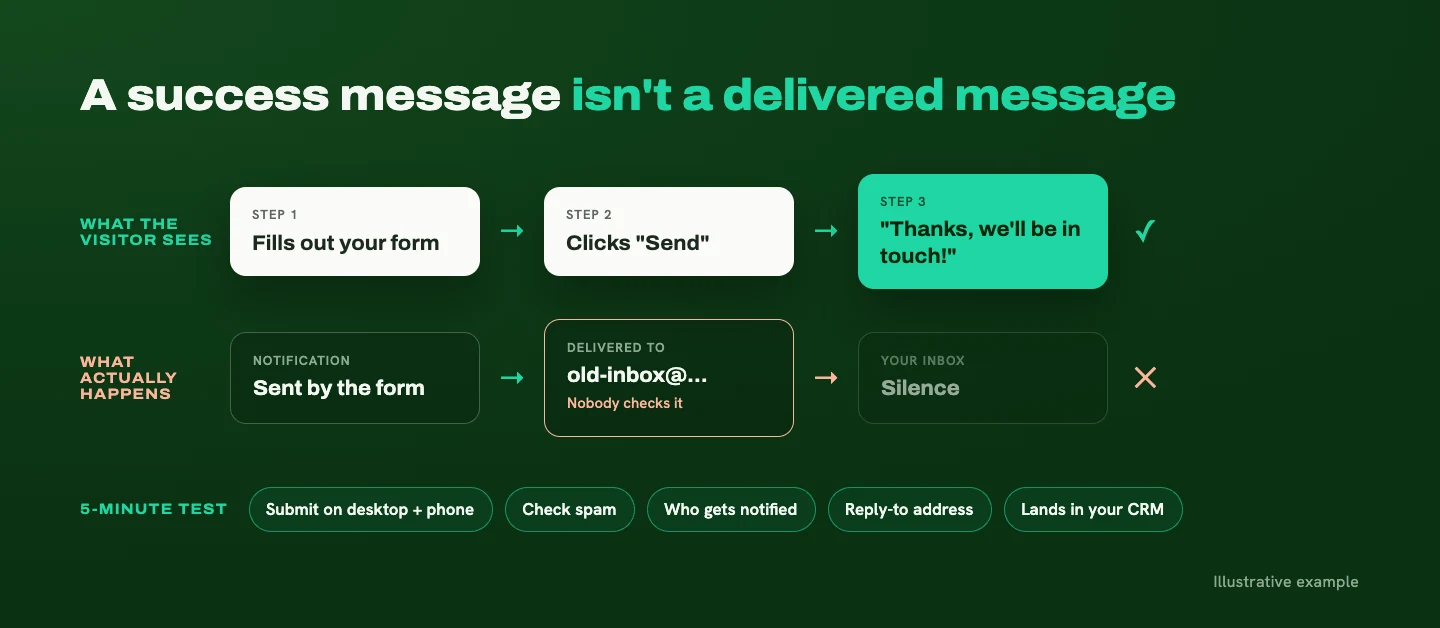
Repeat this test any time you change your form, plugins, hosting, or email settings. It takes five minutes.
2. Check whether the right people are visiting
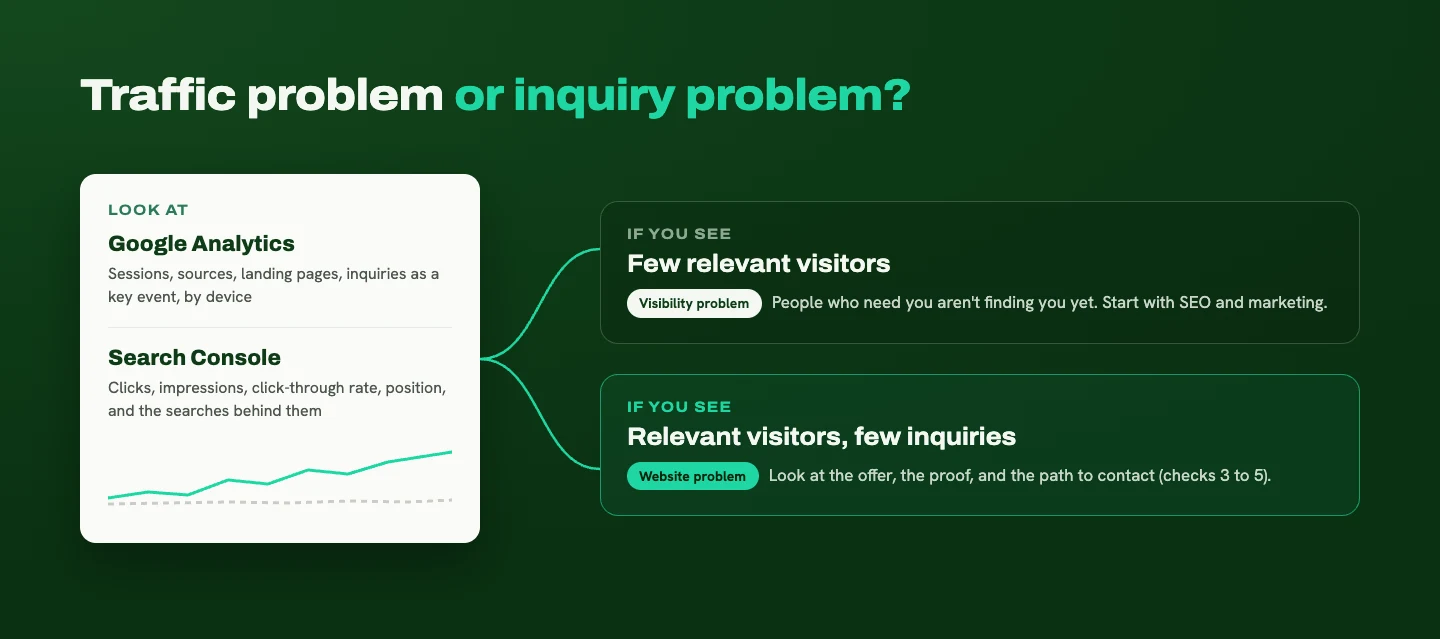
A website needs relevant visitors before you can judge whether it generates inquiries. So the next question is whether you have a traffic problem or an inquiry problem.
In Google Analytics, look at sessions, where visitors come from, which pages they land on, how engaged they are, and how many complete an inquiry. Mark your form submission as a key event, which is Google's term for an action that matters to your business (Google Analytics Help). Then compare results by device and by source. Mobile visitors might be having a very different experience from desktop visitors.
In Google Search Console, look at clicks, impressions (how often your site appeared in search results), click-through rate, and average position (Search Console Help). Then dig into the searches and pages behind those numbers. Are people finding the services you actually want to sell?
What the numbers tell you:
- Few relevant visitors points to a visibility problem. People who need you aren't finding you yet, and that's an SEO or marketing question before it's a website question.
- Relevant visitors who don't inquire points to the website itself. That's your cue to look at the offer, trust, and contact experience (checks 3 through 5).
One caution: engagement numbers are clues, not a verdict. Someone can spend a long time on a page because they're interested or because they're confused. Pair the data with feedback from real people.
3. Make sure the offer is clear
Can visitors understand what you do, who you help, and what they gain from working with you? If any of those take effort to piece together, people tend to move on rather than ask.
I covered this in detail in Why your B2B website isn't bringing in the right inquiries, so here's the short version: your homepage and services pages should answer those three questions quickly and specifically. A list of deliverables isn't enough on its own. Explain the outcome.
4. Give visitors enough reason to trust you
For B2B service businesses, relevant proof matters more than sheer volume. Ten generic five-star quotes do less than one testimonial from a client who looks like your next one.
The proof I'd prioritize:
- Specific testimonials that mention a real result or experience
- Project examples that show the kind of work you want more of
- A clear process, so people know what working with you involves
- An identifiable person behind the business, with a name and a face
- Credentials and partnerships, when they mean something to your buyer
Where you put proof matters as much as what you include. Place it near the claim it supports. If you're describing a service, put a related example or testimonial nearby. If you're asking someone to book a call, tell them who they'll talk to and what the conversation involves.
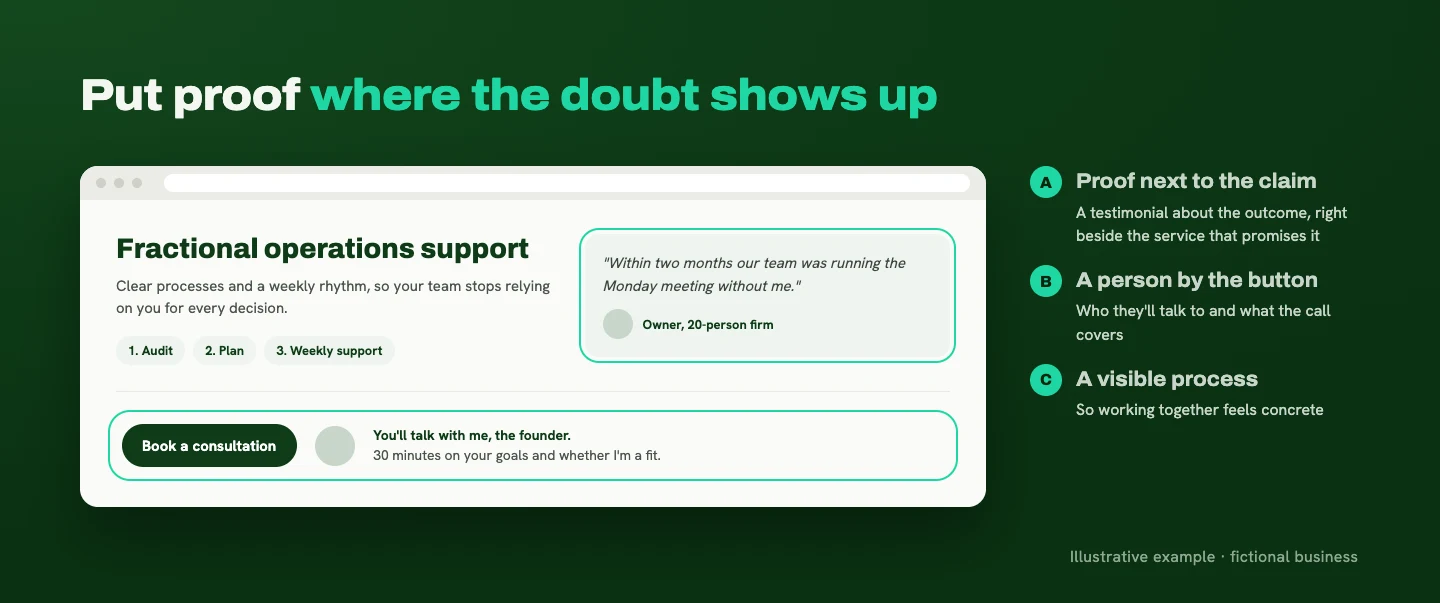
The goal is to answer "Can this person help a business like mine?" without making visitors hunt for reassurance.
5. Make the next step feel easy
Sometimes a website asks for more commitment than the visitor is ready to give.
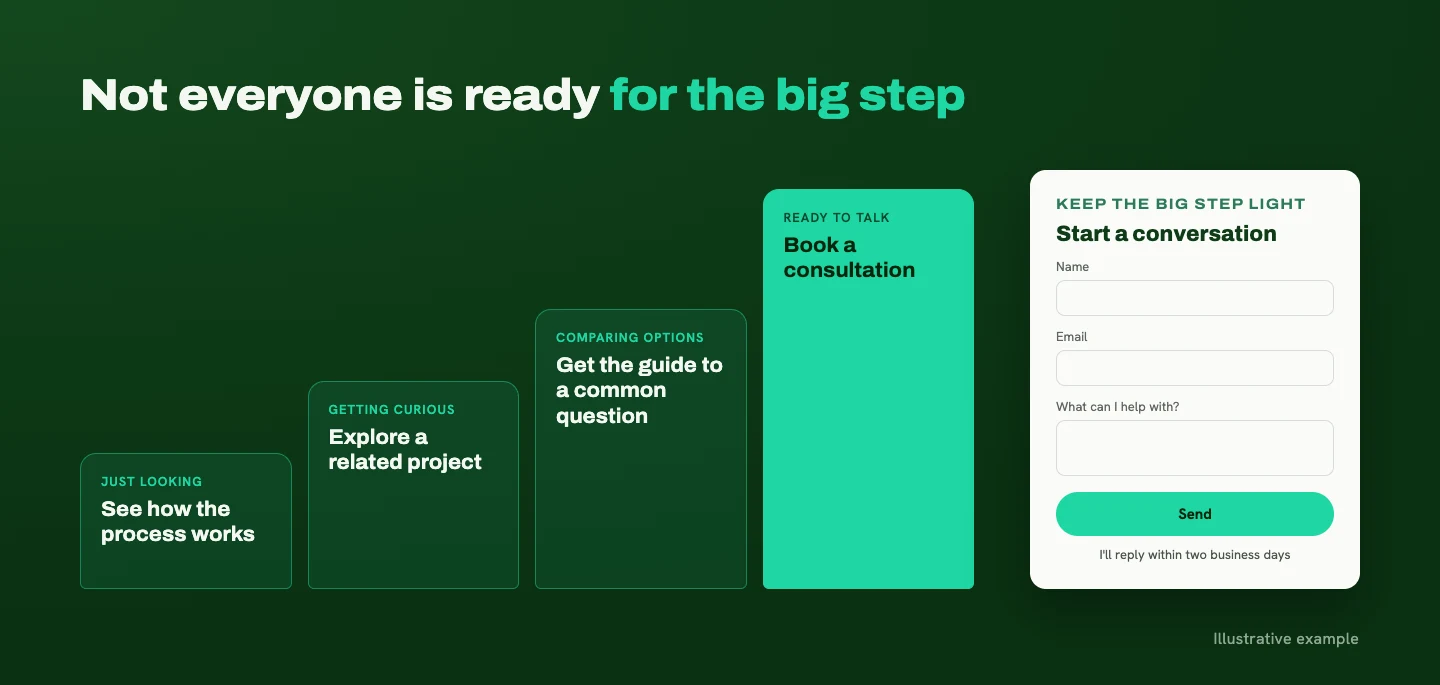
You want people to book a consultation or request a proposal. But someone who just landed on your site may still be figuring out whether your service is relevant and whether they can trust you. When every button asks for the big step, the people who aren't ready yet have only one other option: leaving.
Offer more than one next step. Keep a clear path for people who are ready, and give everyone else a smaller, useful step. That could be exploring a relevant case study, downloading a helpful guide, watching a short explanation, or reviewing how your process works. Each option should answer a question or build confidence. A free guide that immediately triggers an aggressive sales pitch doesn't make anything feel easier.
Make the big step manageable, too. Long forms, unnecessary required fields, and vague buttons add hesitation. A first inquiry usually doesn't need the detail of a full project brief, so ask for what you need to start a conversation. Then explain what happens after someone hits submit and give a realistic response time. "I'll reply within two business days" is more reassuring than silence. (I wrote more about where to put calls to action and what they should say.)
Give useful pricing context. I'm in favor of sharing pricing when it's accurate: a starting price, a typical investment range, or clearly defined packages. It helps visitors judge fit before they spend time on an inquiry. A starting price should reflect a real scope someone can buy, not a number that almost never applies. For custom work, explain what affects the price. If you don't publish numbers, explain how estimates work and what the first conversation covers.
You're building a relationship, and your website needs to support the steps that lead up to the sale, too.
What this can look like
An illustrative scenario, not a client story. A service business has a polished website, but nearly every button asks visitors to book a consultation. The owner wants more inquiries, while prospects are still trying to understand the service and whether it fits their needs.
A useful change would be adding an option to explore a relevant project example, or to get a guide that answers a common question. The consultation stays easy to find, but visitors now have another way to learn before starting a conversation. The website gets a role beyond asking for the sale: helping people become confident enough to take the next step.
Can a website be too polished?
Polish isn't the problem. Design becomes a problem when it makes the website harder to use.
That looks like animations that delay access to information, navigation visitors have to decode, low-contrast text that's hard to read, or layouts that fall apart on a phone.
I love personality and expressive design. The essential information still needs to be easy to find, read, and act on. Visual hierarchy, meaning the way size, contrast, spacing, and placement guide attention, should point people toward your message and your next step.
The quickest way to check: ask someone unfamiliar with your site to find a service and make an inquiry while you watch. Where they hesitate will tell you more than another round of visual tweaks.

What to stop worrying about
Stop assuming the answer is another cosmetic change. A new font, button color, or trendy animation might improve the presentation. If visitors don't understand the offer or the form doesn't work, it won't solve the underlying problem.
Stop treating every visitor who leaves as a lost customer. Some are researching. Some aren't a fit. Some will come back later. You don't need everyone to inquire. You need the right people to be able to.
Focus on whether qualified visitors can understand your value, find convincing proof, and take the next step. That gives you something concrete to fix.
Find the leak before you fix it
When a pretty website isn't generating leads, work through the checks in order: make sure the form works, confirm the right people are visiting, then look at the offer, the proof, and the path to contact. Each step narrows down where inquiries are getting lost, so your next change solves a real problem instead of a guess.
Often the fix turns out to be focused: a clearer services page, proof in the right places, a shorter form, or a smaller next step for visitors who aren't ready to talk yet. If that's where you land, a website refresh can tackle it without starting over. (Not sure which you need? Here's how I think about refresh vs redesign.)
If you'd like help finding where your site is losing people, send me a note. I'll walk through it the same way, starting with whether your form actually reaches you.
Ready for a website that makes this easier?
Tell me about your business and your goals. I'll help you figure out what your website needs to say, and how to make it clear.
Start Your ProjectLiked this one? Get the next article in your inbox.
Your website should work as hard as you do. Each new article shows you where yours is quietly losing leads, trust, or attention, and exactly what to fix. It lands in your inbox the day it's published, and you can unsubscribe whenever you like.
You're on the list. Thanks for subscribing!
Something went wrong. Please try again in a moment.

A strategy-led design studio creating clear, thoughtful websites for B2B and professional-service businesses.
Start Your ProjectDotted Octopus
© 2026 Dotted Octopus. All Rights Reserved.
Back to top ↑