Trendy or timeless? Build a website you'll still love next year
Web design trends for service businesses in 2027, and how to choose the ones that tell your story.

Jessie Borgmann
Founder, Dotted Octopus
Every fall, the trend lists arrive: bold type, bento grids, 3D everything. It's fun to scroll through them. It's harder to know which ones belong on a website for a consulting firm, an accounting practice, or a specialized agency.
Here's my take: a trend is worth using when it helps tell your business's story. Your website should help visitors recognize their problem, understand how you solve it, trust you, and know what to do next. A trend that supports that story can make your site memorable. A trend that competes with it is just decoration.
So before the list, here's the test I use.
How to decide if a trend belongs on your website
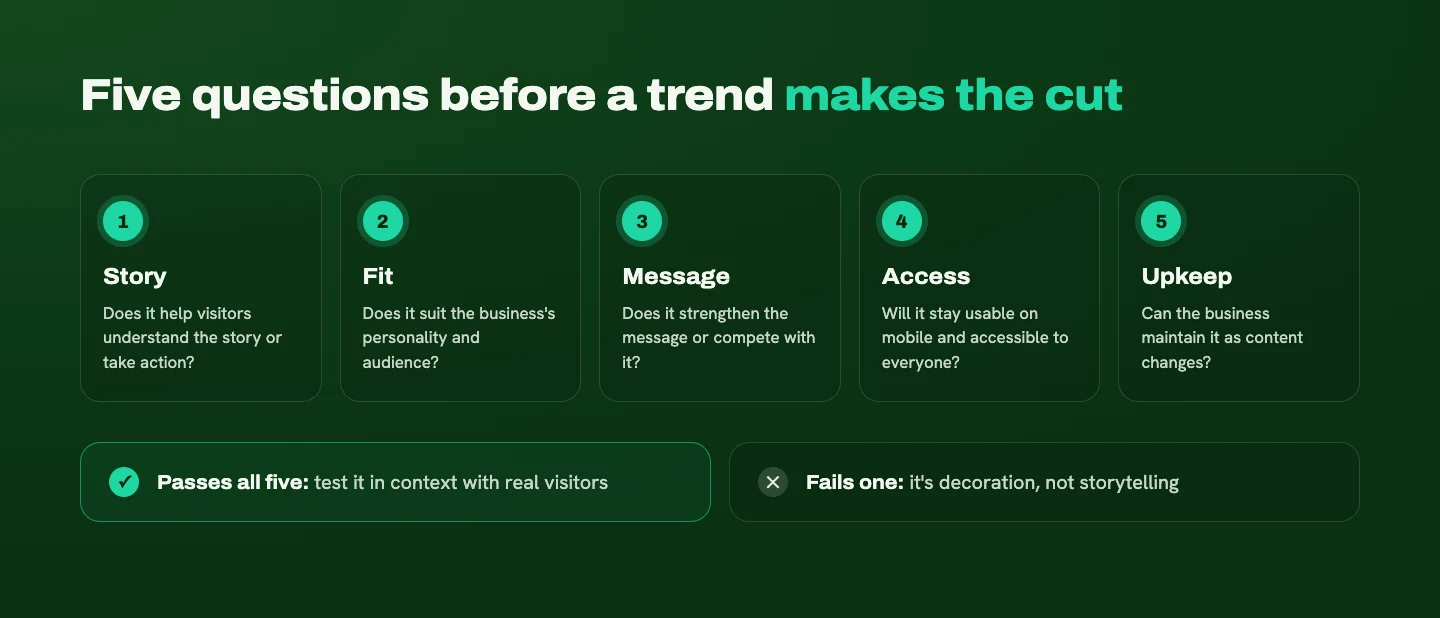
I start with the story the website needs to tell: what your customer wants to accomplish, what's getting in their way, and how your business helps. Then I ask five questions about any trend:
- Does it help visitors understand the story or take action?
- Does it fit the business's personality and audience?
- Does it strengthen the message or compete with it?
- Will it stay usable on mobile and accessible to different visitors?
- Can the business maintain it as content changes?
Then I test the idea in context. Can someone find the service they need, understand its value, and spot a comfortable next step? An impressive design preview doesn't always translate into an easy experience, so real feedback matters.
With that filter in place, here are the 2027 web design trends worth knowing about, sorted by how well they tend to fit service businesses.
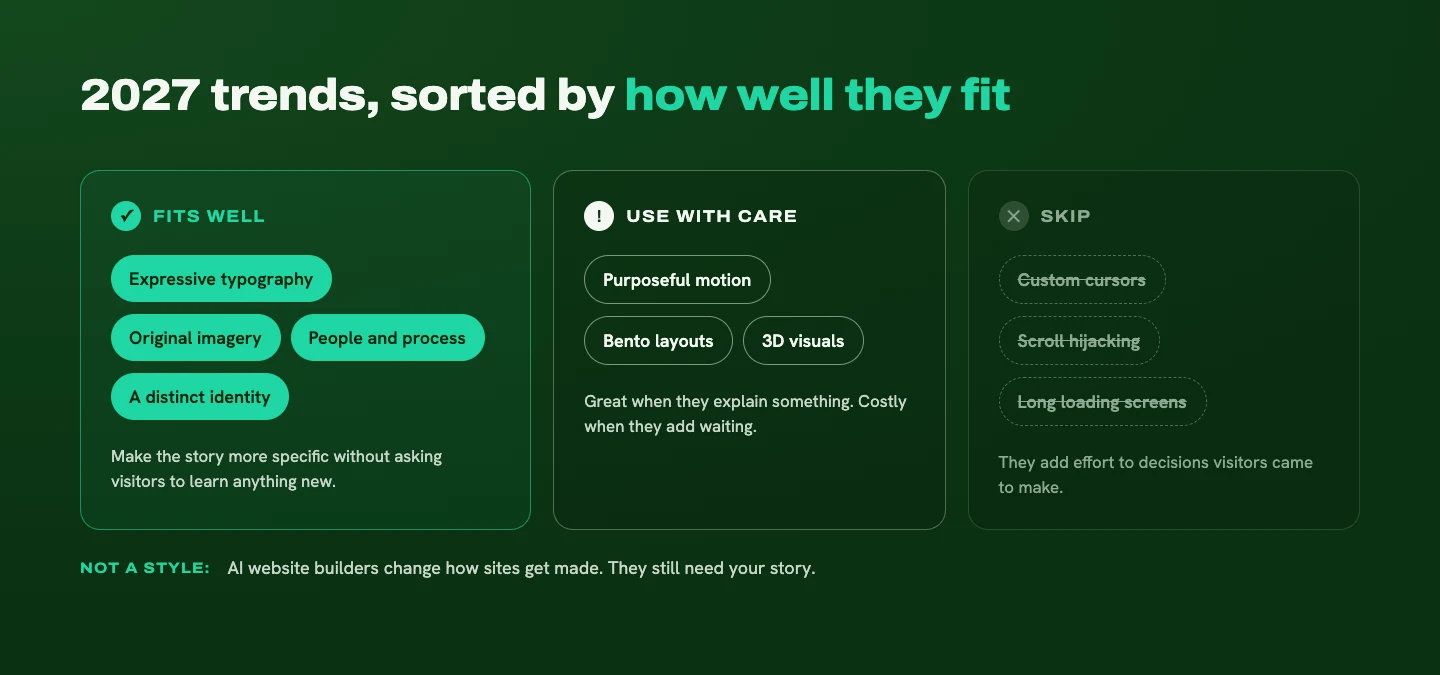
Trends that fit service businesses well
Expressive typography
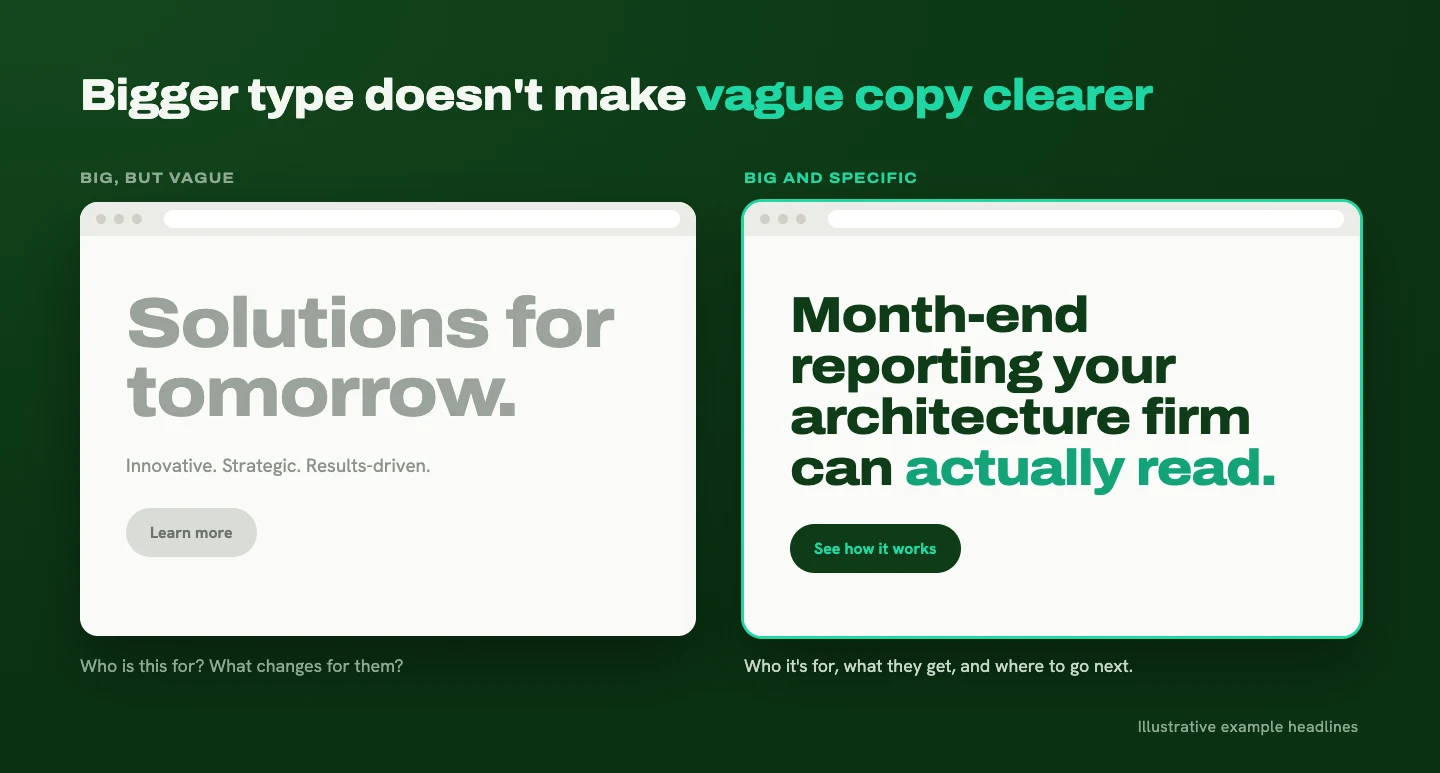
Big, confident type gives a website personality while helping visitors spot the most important message first. It's one of the strongest storytelling tools you have: the headline sets up the story, and the type size tells people where it starts.
The catch: the headline still needs to say something useful. Making vague copy enormous doesn't make it clearer. "Solutions for tomorrow" in 120-point type is still "Solutions for tomorrow." Pair expressive type with a specific message about who you help and what changes for them.
Original imagery
Team photos, real projects, and behind-the-scenes details help people understand who they're considering working with. Stock photos can fill space. Original imagery fills in the story.
For a service business, this matters even more, because you're asking people to trust you with something they can't hold in their hands. Seeing the actual people and work gives your business a recognizable identity and supports its credibility.
Showing the people and process behind the work
This is the trend I'd add to most lists. Show real photography, project details, sketches, and short explanations of how something comes together. Your process is part of your story, and it helps visitors picture what working with you looks like.
Those details make an intangible offer easier to understand. A three-step process with a photo of a real workshop session tells a prospect more than a paragraph about being "collaborative."

Expressive typography and original imagery work especially well together. They help tell a more specific story (who you are, how you work, what customers can expect) and create a distinctive website without asking visitors to learn an unfamiliar interface.
A distinct identity, not a generic one
You'll see this trend described as "the end of beige minimalism." I'd frame it differently. Beige isn't the problem. A website that could belong to any business is.
Minimal, neutral design can be beautiful and calm. It goes wrong when every choice is the safe default: the same layout, the same stock photo style, the same "We help businesses grow" headline. Visitors can't tell your story apart from the five competitors they opened in other tabs.
A distinct identity can come from a signature color, an illustration style, a photographic direction, or simply a voice that sounds like you. The goal is a website that feels like your business, whatever palette you choose. (Brand identity work is where those choices get made.)
Trends to use with care
Purposeful motion and microinteractions
I sort motion into two categories.
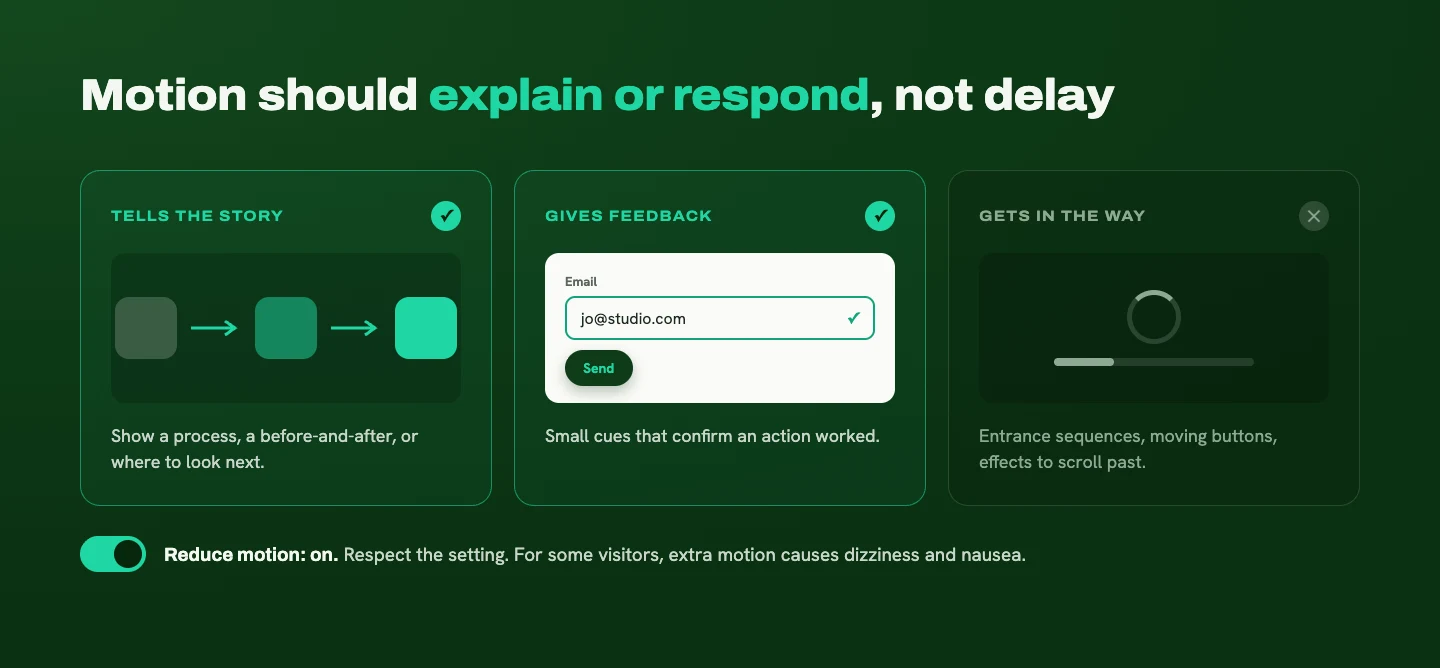
Movement that tells a story. Animation can explain a process, show a before-and-after transformation, or guide attention to the next part of the page. Used this way, motion becomes part of the narrative.
Microinteractions. These are the small details that give visitors feedback: a button that shifts slightly when you hover over it, a form field that confirms your email looks right, a friendly message after you hit submit. They make a site feel responsive and cared for.
Where motion goes wrong is when it turns a simple task into a production. A visitor shouldn't have to wait through an entrance sequence, chase a moving button, or scroll past several effects to understand your services. If an effect adds waiting or distracts from the message, I'd question it.
Motion also affects accessibility. For people with vestibular disorders, which affect the inner ear's sense of balance, unnecessary motion can cause dizziness, nausea, and headaches. Accessibility guidelines recommend letting people turn off motion triggered by interactions unless it's essential (W3C). Respecting a visitor's "reduce motion" setting is a good habit for any animated site.
Card-based (bento) layouts
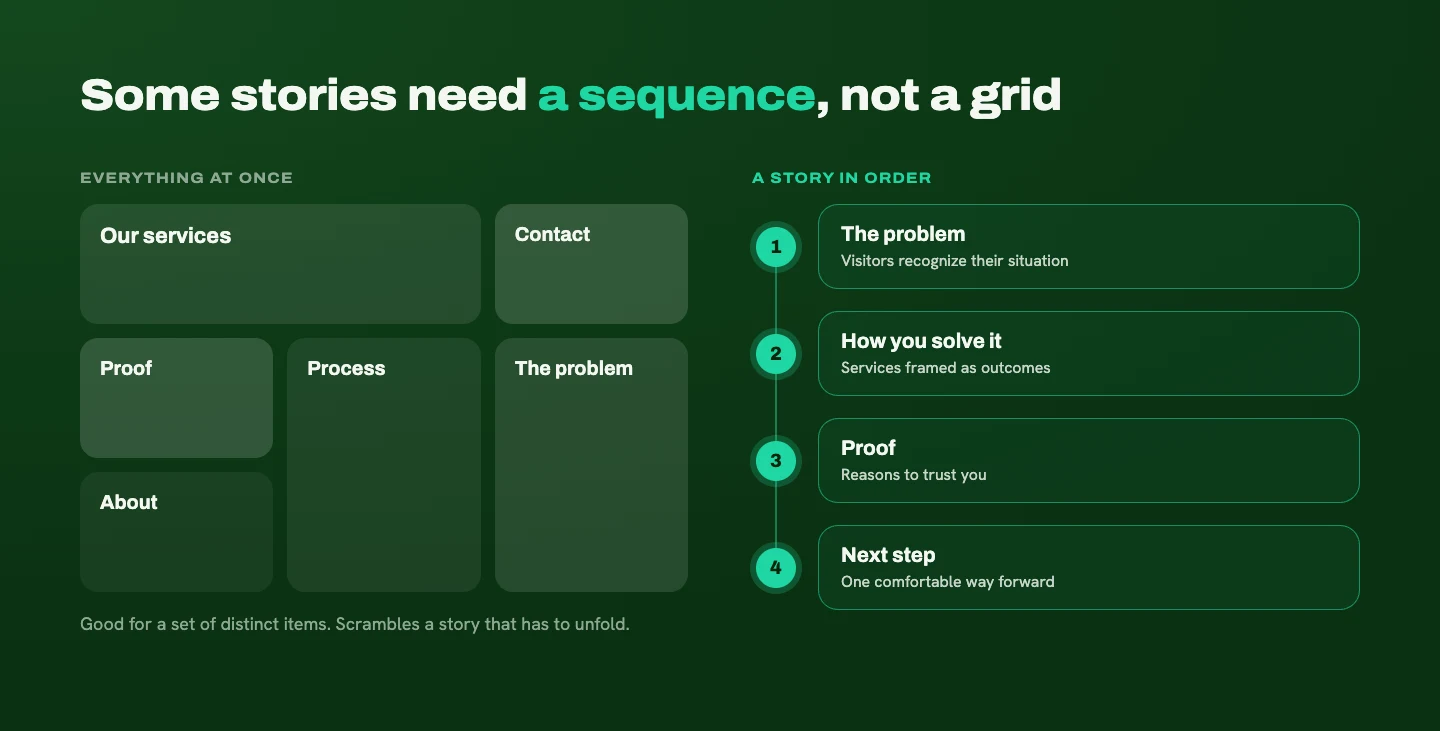
Bento layouts arrange content in a grid of boxes of different sizes, like a bento lunch box. They're useful for organizing distinct pieces of information, such as a set of services or a quick snapshot of what you offer.
They deserve some scrutiny, though. Putting everything in a rounded box doesn't automatically create a clear hierarchy. And some stories need a sequence rather than a collection of tiles. If visitors need to understand a problem before they can appreciate your solution, a grid that shows everything at once can scramble the order of your story.
3D visuals
Immersive 3D is one I'm drawn to creatively. It can visualize a process or make an abstract service feel more tangible.
But it needs to earn its place. For many service businesses, clearer copy and strong project examples will do more useful work than an elaborate interactive scene. I'd consider a restrained 3D visual when it helps explain the offer or supports the story, and I'd be much more cautious about building a whole website around it. The question is whether visitors leave understanding your business better.
AI-built websites: a change in how sites are made
AI website builders show up on a lot of trend lists, but I'd treat them as a change in how websites get made rather than a visual style. They can produce a layout and copy quickly. What they can't supply on their own is your story: the specific customers you serve, the problems you solve, and the way you work.
If you use AI to get started, review the result the same way you'd review any trend. Does it tell your story, or a generic version of it?
Trends I'd skip
Some effects add very little to the decisions service-business visitors need to make:
- Custom cursors that replace the familiar arrow and make people relearn how to point and click
- Scroll hijacking, where the site takes over your scrolling speed or direction
- Elaborate loading screens that make visitors wait before they see anything useful
I'll also skip predicting which aesthetic is about to disappear. Styles come back, and thoughtful execution can outlast a trend cycle. The more useful skill is knowing how to choose.
What makes a website timeless
A clear, relevant story, supported by readable typography, thoughtful spacing, intuitive navigation, and credible proof.
Visitors need to recognize their problem, understand the value of your solution, find reasons to trust you, and choose a next step that fits how ready they are. Those needs don't change when visual trends do. That's the part of Donald Miller's customer-centered StoryBrand approach I come back to most: visitors should see themselves in the story and understand how you can guide them forward. (I wrote more about that in Your customer is the hero.)
Timeless doesn't have to mean neutral. A distinctive color palette, illustration style, or photographic direction can have real staying power when it belongs to the brand.
The visual expression can evolve. The story gives your website continuity.
How to build a website that can evolve
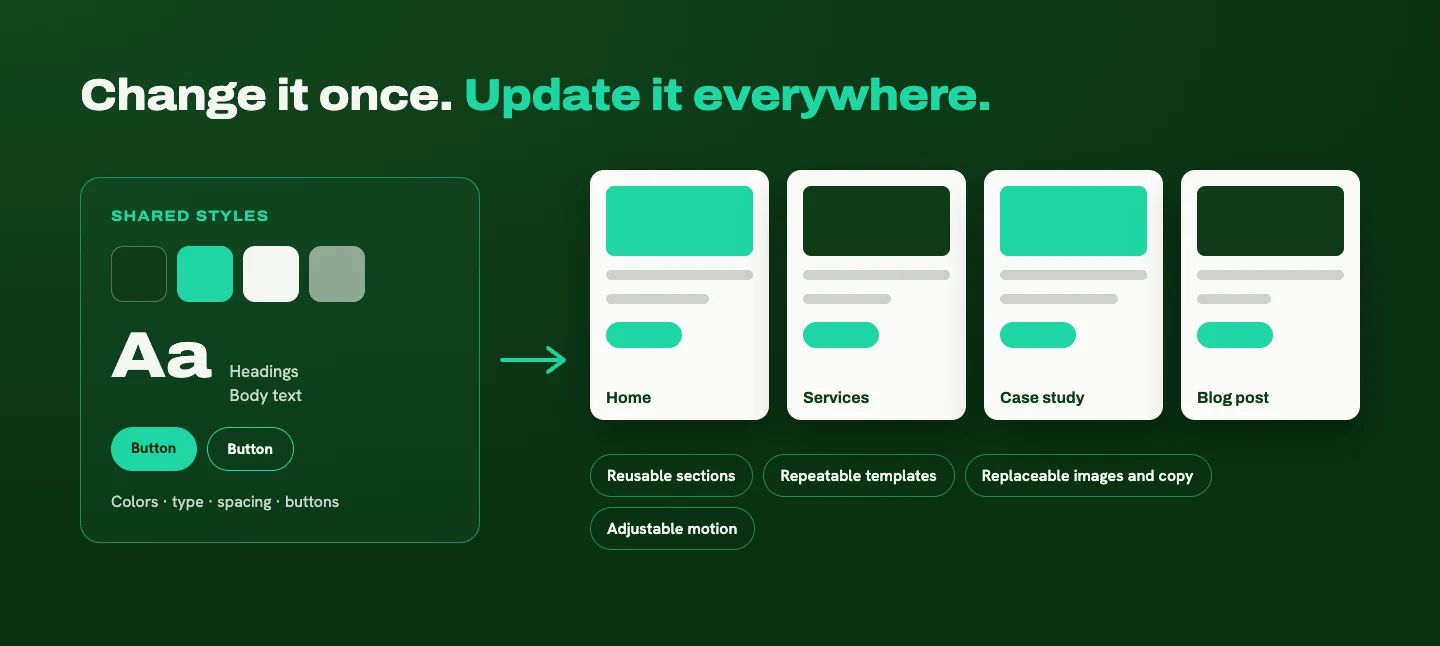
You don't need to redesign every time the trends shift if the foundation is built for change. Here's what I build in:
- Shared styles for colors, typography, spacing, and buttons, so a visual update happens in one place instead of on every page
- Reusable sections for services, testimonials, project examples, and calls to action
- Repeatable templates for blog posts and case studies
- Replaceable images and copy that can change without breaking the layout
- Adjustable motion that can be dialed up or down without rebuilding a page
I apply this approach in both WordPress and Webflow, using the tools that fit each setup.
I also give every section a clear role in the story. One establishes the customer's problem, another explains the service, another provides proof. When you know what each piece needs to communicate, future updates become intentional instead of random.
This won't prevent every future redesign. It does make routine improvements more manageable, and it lets you refresh the look as your business grows while keeping the experience coherent. (If you're weighing that decision now, here's how I think about refresh vs redesign.)
Let the story choose the trend
Borrow the ideas that fit your identity, help your audience, and make your story easier to understand. Skip the ones that add waiting, confusion, or a look that could belong to anyone. Your website should feel like your business. Trends can help express that, but the story gives them a purpose.
If you're curious which of these would suit your website, or which ones to retire, I'd love to help you sort through them. Tell me a little about your business and your site, and I'll share where I'd start.
Ready for a website that makes this easier?
Tell me about your business and your goals. I'll help you figure out what your website needs to say, and how to make it clear.
Start Your ProjectLiked this one? Get the next article in your inbox.
Your website should work as hard as you do. Each new article shows you where yours is quietly losing leads, trust, or attention, and exactly what to fix. It lands in your inbox the day it's published, and you can unsubscribe whenever you like.
You're on the list. Thanks for subscribing!
Something went wrong. Please try again in a moment.

A strategy-led design studio creating clear, thoughtful websites for B2B and professional-service businesses.
Start Your ProjectDotted Octopus
© 2026 Dotted Octopus. All Rights Reserved.
Back to top ↑